Hiren Boot CD From USB Flash Drive
Step 1Connect USB Pen Drive (512MB or more)
Step 2
Download and Run USB Disk Storage Format
 USBFormat.zip (34KB)
Step 3
Download grubinst_gui
grub4dos.zip (188KB) and Run as Administrator
Step 4
Copy grldr and menu.lst (from HBCD folder) to the usb drive
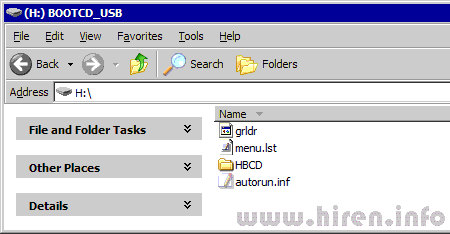
Step 5
Insert the BootCD (9.7 or newer) in the CD Drive and Copy everything from CD to USB Flash Drive.
Step 6
Test Your USB Drive
Added Notes: We can additionally put any booting ISO files here such as WIN XP, Hiren's boot, or even windows 7 to make it bootable directly via USB ports (USB sticks, external HDDs...)
Change the content of the menu.lst file to as following:
timeout 0
default 0
title Boot Acronis Disk Director Suite ISO - (0xFF)
find --ignore-floppies --set-root /ADDS.ISO
map /ADDS.ISO (0xff) || map --mem /ADDS.ISO (0xff)
map --hook
chainloader (0xff)
Then change the name of the ISO file we want to boot up to ADDS.ISO as we define it earlier in the menu.lst or you may change the ADDS.ISO in the file to whatever you want (three parameters must be changed to the same one indeed).
